

On Sitejabber, businesses may not offer incentives or pay to remove reviews. Learn more about our Review Guidelines.
From the business
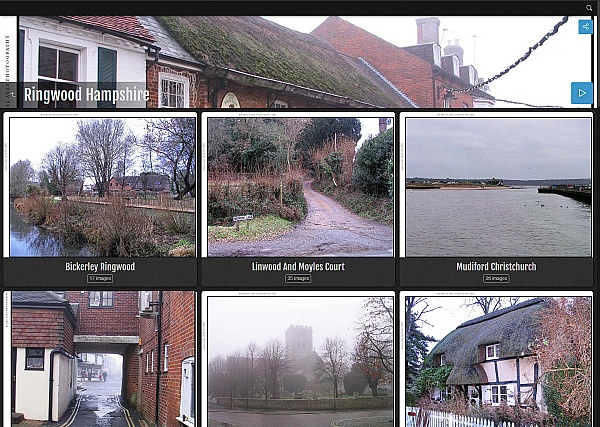
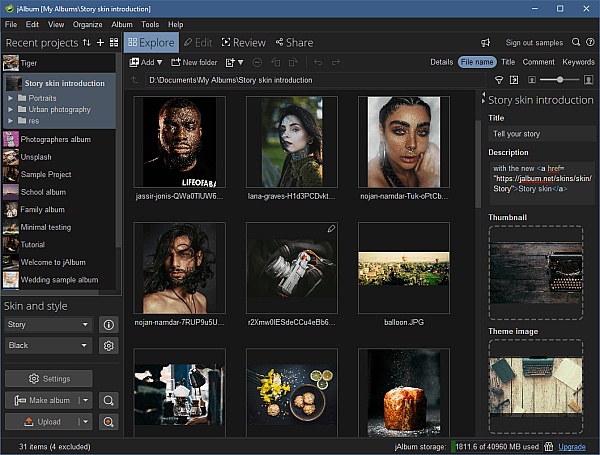
The jAlbum desktop software creates web photo galleries for any web site. Perfect for photographers, individuals and organizations wanting to share images and videos on their own sites without relying on centralized services.
jAlbum has been in business since 2006 and is a trusted solution for independent photo sharing. To date, jAlbum galleries are used on over 220 million web sites (Data from Majestic.com). jAlbum has received top user reviews with SiteJabber, TrustPilot and Capterra
Why use jAlbum?
Integrity: YOU have full control of the management, storage, and presentation of your images no lock-in. Host your images with us or with any web hotel you like. Your galleries will work - even without us.
Convenience: Manage large amounts of images right from your PC
Expression: Not all web sites look alike, so why should your galleries? With jAlbum, you can customize the visuals and functionality of your galleries to your liking.
jAlbum is available for Windows, Mac and Linux.


jAlbum Reviews Summary
jAlbum has a rating of 4.7 stars from 162 reviews, indicating that most customers are generally satisfied with their purchases. Reviewers satisfied with jAlbum most frequently mention many years, photo albums and latest version. jAlbum ranks 2nd among Photo Sharing sites.
We monitor reviews for authenticity

Have been a jAbum subscriber for about 15 years. Love it. But - I'm getting old, and increasingly need a bit of tech help. I'd be thrilled if jAlbum offered in-person in my home tech support! Til then, I'll keep on renewing. NB: Date below is apparently required, but not relevant.

I am a Mac user and have been for several decades. Before that I used windows though have forgotten most of what I knew. My main issue with Jalbum is trying to change the directory after I already started the project. After all these years I still have not figured it out so I delete the project and start anew and select the file location before making anything. Otherwise I am satisfied with the program. Over the years there have been steps to simplify setup but there is a lot that needs to be done. A Mac programmer could help clean up and simplify the interface. Yes, Jalbum allows customization however, I rarely make changes because I don't like needing to relearn the complex procedures to just make a few simple changes. Thank you.

Thanks for your feedback. To change the directory, open Settings->General, then tick the "Change directory locations" checkbox. Now you can edit the directory, either by typing the new path, by using the folder selector or even by dragging and dropping a directory onto the "Image directory" field. You can also move the whole project folder to a new location in order to have the directory updated to reflect the new location.
I like jAlbum a lot and have used it for years. However, the user interface is difficult and hard to use - a high learning curve. I enjoy photography and one of the last things I want to do is spend time researching and learning new program procedures and looks, therefore I just keep doing the same thing every time rather that try different looks and skins. Ease of use has improved over the years however suggest you employ a Mac programmer to simplify the user interface while allowing paths for Advanced procedures. I am still trying to figure out how to change the directory location after a slideshow has been started or completed. I am thankful for the subscription features since it ensures continuity and viability. Thank you and wishing you continues success.

I've been using JAlbum since a few years after its introduction. It continues to get better each year and is unmatched in quality and functionality. The skins are excellent, and the support I have received regarding customization and issue resolution has been nothing short of amazing. You can see my albums at https://edgewoodgardens.net/image-galleries/.
Thanks for these kind positive words John! Nice to see the Lizard skin in use as well:-). I think we can all relate to experiences with crappy customer support. It seems to me that the larger the company is, the lower the support quality is.

The photo albums are fantastic and the various skins allow for excellent viewing experiences. This is a great tool.
Really happy to hear this. Thank you William!

Seems to be a nice update, just wish a few of the old skins worked. Oh well, guess we will look for new ones

While still learning J, finding it should be a great new tool for my various websites.
But there are lots and lots of options that, do not appear to follow a flow or matches on the pages. Easy to click here, clash there, or click 3 options here and have to go over there for 2 similar.
I continue to miss a check box with new projects, often having to fumble around to find it buried on one of the many settings pages.
Thanks for your feedback. Please let us know what skin you're referring to. Each skin is like a program within the program. You will also benefit from using CTRL+Space to type your way to the right setting. That's FAR faster than browsing through the many panels.

Happy to hear you're satisfied with us and that we could assist Scott!

The app has become very sluggish and timed out often
I have the latest version
Dear Ernest,
Sorry to hear you have problems with our app. Please contact us at support@jalbum.net so we can work out a solution. We need to know at what point in time/usage it becomes sluggish for starters. Ideally, if you can provide a screen recording, please pass that on to us.
I would like a way to develop projects on your cloud server and then an app like way to "relocate" the project to my own drives and have it automatically reset all drive / file locations within the projects menus to the new "to" location.

I've used album for almost 20 years, just doing simple stuff, usually with the same skin, sometimes adding comments for each or most pictures which can make the album into a story. It's easy to use and publish each album, it works equally well with Linux or Windows. I do wonder... for someday when I want to stop paying for the storage+server and the HTML/whatever that is published... wonder if I can export each album back to my own systems. I would not expect that, but it does sound like it would be easy (but not beneficial to the jalbum team!) to implement. For all I know, such an export/copy already exists. I upgraded my storage amount once and expect that will hold me for many years to come...thanks! Meanwhile google photos keeps trying to improve and compete, but I don't expect the same thing from google.
Thanks for your review! JAlbum never locks you in. You can download full galleries back to your computer. Just connect to your account, the right-click a gallery and select "Download". To later on upload that gallery to another computer, connect to the new account and drag and drop the downloaded gallery folder onto the desired destination.

So simple to use and updates make it work even better
Indeed:-) Thank you for your words!

I am just getting started with the software and feel like I've only learned.01 percent of its capabilities and already accomplished 90% of what I needed to do with making a responsive website display of 1700+ pictures collected over almost 20 years.
Tech support has been surprisingly very quick and helpful.
We're so glad you're getting along fine with jAlbum Jeff!

I created an album of my Astro images. The problem is I do not know how to access the album for including in an html file. Is there a single file I can access?
Larry Simpson
Hi Larry. You have full access to all files jAlbum produces (Tools->Open directories->Output directory). We'd love to help you if you contact our support at support@jalbum.net or via our user forum at https://jalbum.net/forum. Simply giving us a 1-star rating won't help you and hurts our business.

Only program I use to make my website photos. I create them and review them then upload to my website.
Happy to hear that Michael! Thanks for your review!

If anything, there may be TOO much flexibility! I had to spend some time going through all the album/skin settings, reviewing the help documentation, to begin to understand all the features.
We're glad you made it through:-) Thanks Jefferey!
PS. Do use the search bar in order to find the setting you need. Just type what you're looking for.

While slide maps displayed fine, the folder map did not. The issue was tracked down to a Mac file being "ingested" by jAlbum and gumming up the works. (technical terms). Kudos to Laza.
Good that we could sort it out. Thanks for your review Tony!

I purchased jAlbum years ago and put pictures on your on-line server. It constantly rejected my renewal for two weeks or more. You were unable to resolve the problem until recently but I wasn't notified it was resolved. I tried again and my credit card was accepted.
Sorry to hear about that experience. Were you in contact directly with us (support@jalbum.net) or our payment partner Fastspring?

I started to use jAlbum a year ago for something slightly different from an Image Gallery: cataloging and compiling information about pieces of hardware in a collection. It takes a while to get behind the features and possibilities, but after that time it is almost 'addictive' to use, optimizing layouts and contend is fast because you can test-drive without uploading. Managing a large amount of album projects is easy with the grouping feature. There are some idiosyncrasies due to differences between how jAlbum treats files/folders compared to windows, but one can always ask support and an answer comes back in short time. The option to write 'external tools' is very powerful and the folks at jAlbum helped me with importing device specific information from IPTC tags. If you have access to someone with programming skills, possibilities are endless...
It is easy to get started and make a great web site and easy to get addicted to improve on it based on jAlbum's wide selection of features.
Thank you for taking the time to elaborate on what you like about jAlbum Wolf, really appreciated!
/David, jAlbum founder

My needs are rather simple. I'm well pleased with jAlbum and happy with my outcomes!
Happy to hearing this. Thank you Ronald!

JAlbum is the very best web photo display application we have found. It's easy to use and very flexible with many templates, or skins as they are called for different formats.
Many thanks for your review Larry!
I've been using jAlbum for years to create photo albums of various sorts. Many are simply of the family type and chronicle events of the year including travel, holidays as well as other things of note. I have also used jAlbum as a tool on professional and business websites to add photo documentation to various projects.

After a little practice jalbum is easy to use. Has the best features.
But that nothing compared to their personal service.
Blushing here:-). Thank you Paul!


- Sitejabber’s sole mission is to increase online transparency for buyers and businesses
- Sitejabber has helped over 200M buyers make better purchasing decisions online
- Suspicious reviews are flagged by our algorithms, moderators, and community members
Similar businesses you may also like
See more Photo Sharing Businesses




- Sitejabber’s sole mission is to increase online transparency for buyers and businesses
- Sitejabber has helped over 200M buyers make better purchasing decisions online
- Suspicious reviews are flagged by our algorithms, moderators, and community members
Thanks for your feedbak Kay. On occasion we set up video calls to resolve tricky problems, but the problem is naturally that it's time consuming. Our user forum is generally the best channel to receive support.