

On Sitejabber, businesses may not offer incentives or pay to remove reviews. Learn more about our Review Guidelines.

Punchbowl Reviews Summary
Punchbowl has a rating of 4 stars from 880 reviews, indicating that most customers are generally satisfied with their purchases. Reviewers satisfied with Punchbowl most frequently mention birthday party, guest list and customer service. Punchbowl ranks 1st among Event Planning sites.
We monitor reviews for authenticity

I wanted to have a great invite for a business meeting. I honestly never used Punchbowl and more importantly, hadn't heard of it. I am SO glad I found it! It was user friendly, easy, seamless, and professional. I will always use moving forward!

This is the fifth time I have used Punchbowl evites, and it continues to be a joy! Wonderful designs, THE most friendly interface (personalizing, editing, adding/subtracting guests, etc.) and free to use. At some point I will want to add and pay for some of their premium services, but they give so much free to their users. Punchbowl works for a small group as well as a large one. It's versatile and wonderful.

I use Punchbowl every time I can.
The invitations are great and the "reminders" save me phone calls! I don't know how anyone can live without it!

Is an easy and convenient app for party invitations. I always use it because it has so many invitation's option. Thank you

Cute invitations to select from! Easy to create & send! Would totally use again thank you :)

I usually send out store bought invitations. After using this app I will never do that again. A text message is so much more convenient. I also like how the invitation still "comes out of the envelope".

Awesome invites for all types of celebrations, large variety to choose from!

I really liked the variety of designs punchbowl has and I
Like how you can see when the people checked your
Invitation. I love punchbowl and would definitely recommend
It to a friend!

I am so glad I found Punchbowl! Invites to my sons party were so easy to do and quick to manage.

My first time experience was great and I'll definitely be back. I was able to decorate and make the Invitations that I wanted at no cost. This is an excellent app for anyone trying to create magic. I'm

This app was a lifesaver! Easy to use for my son's birthday party. Everyone received their invitation via text, which is great for busy families.

Easy to use the app and self explanatory. Many options to choose from and all you have to do is fill in the text.

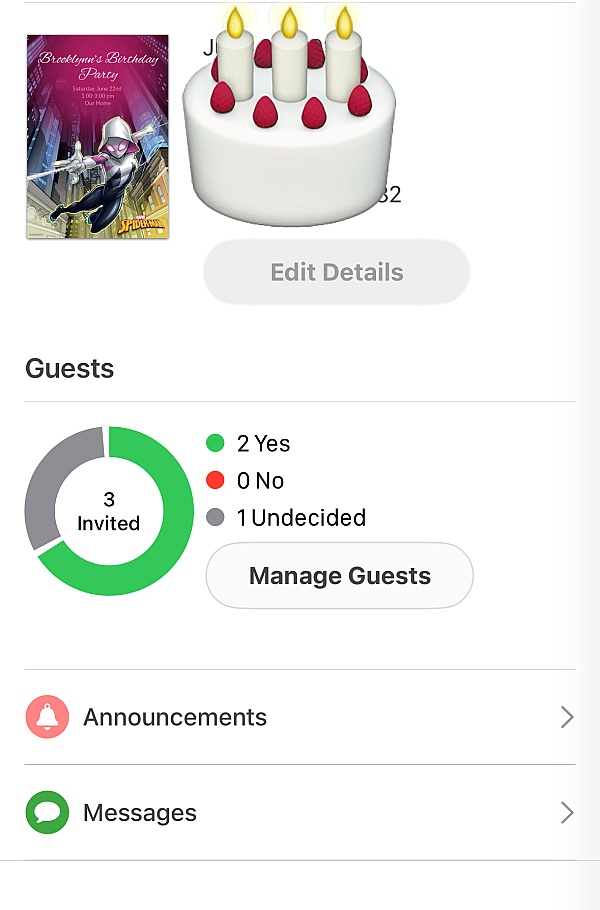
I picked out an invite for texting. Filled it out and sent it out selecting the contacts on my phone. SO EASY! People responded quickly too! Will definitely use again :)

I used Punchbowl the first time for my daughters 2nd Birthday I wanted something cute but definitely something electronic because I was doing most invites through Facebook. I remember her party was Tangled themed and the movie just came out and Party City barely had decorations let alone invites. Found a beautiful card purple and pink invite with a big #2. Literally have been using it for every event since. And so have my friends after me. Just celebrated my eldest daughters 10th Birthday and I love that Punchbowl has every invite I ever made saved on my profile. I've even gotten discounts from party city for decorations just for making an invite I was going to do anyway

Punchbowl was a great option for us to use for a last minute birthday party, we didn't have any time to send out invites. The website was easy to use and all my guests responded fairly quickly. I will definitely use this again.

So convenient, easy to track, so many variations of cards. I enjoy using it and will definitely be using it again.

Kept a list of invitees for us... let us know who and who had not RSVP'd. Great invitation selection and thank you card selection. Would differently recommend and use again

Easy to use. User friendly... let me know who opened the invite and alerted me when they RSVP'd sent reminders to my guest. Will definitely use punchbowl again!

Fantastic resource, that is easy to use and very convenient! Lots of designs to choose from and makes managing an event easy!

I've been using Punchbowl for years for personal as well as professional purposes. Every time I send one I always get asked where, how did I do them. I explain that it is so easy to do.
From the business
Punchbowl makes it easy to create and send beautiful, free online invitations and digital greeting cards from your phone, tablet or desktop.




- Sitejabber’s sole mission is to increase online transparency for buyers and businesses
- Sitejabber has helped over 200M buyers make better purchasing decisions online
- Suspicious reviews are flagged by our algorithms, moderators, and community members



- Sitejabber’s sole mission is to increase online transparency for buyers and businesses
- Sitejabber has helped over 200M buyers make better purchasing decisions online
- Suspicious reviews are flagged by our algorithms, moderators, and community members